Deer Antlers with Floral Cut Files: A Practical Guide to Quality and Application
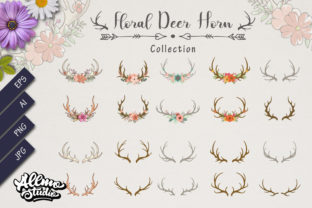
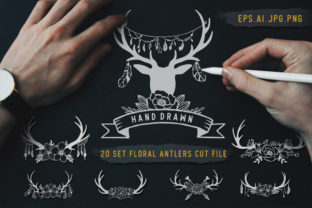
Nature-inspired design elements have a timeless appeal, but achieving that organic look digitally requires more than just downloading the first image you find. Deer antlers with floral cut files represent a specific niche where rustic charm meets botanical elegance, serving as versatile assets for everything from wedding stationery to custom apparel. However, the difference between a professional result and an amateur attempt often lies in understanding the technical nuances of these digital assets. When you acquire a comprehensive set containing 20 types of deer’s antlers floral designs across AI, EPS, JPG, and PNG formats, you are not just getting pictures; you are obtaining a toolkit that demands proper handling to unlock its full potential.
Understanding the Value of Vector Versus Raster
A common misunderstanding among beginners and even some intermediate designers is treating all file formats within a bundle as interchangeable. This approach frequently leads to pixelated prints or frustrating editing experiences. The core value of this collection lies in the vector formats (AI and EPS). These files were originally hand-drawn and then meticulously digitized, meaning they possess mathematical paths rather than fixed pixels. This distinction is critical when scaling designs for large-format projects like wall decals or vehicle wraps.
Many creators mistakenly rely solely on the JPG or PNG versions because they are easier to open in basic software. While these raster files are excellent for web use, blog headers, or digital mockups, they lack the editability required for high-end crafting. If you attempt to resize a standard PNG beyond its native resolution for a t-shirt print, the edges will blur, and the intricate floral details woven into the antlers will lose definition. Always prioritize the AI or EPS files for any physical production. Reserve the JPG and PNG versions for digital previews, social media content, or sublimation projects where the resolution matches your output size exactly.
The Hand-Drawn Aesthetic in Digital Workflows
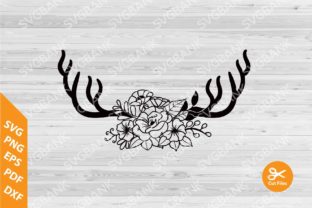
One reason designers seek out manually drawn and digitized vectors over auto-traced clip art is authenticity. Auto-tracing software often creates jagged nodes and unnatural curves, especially in complex organic shapes like antlers intertwined with flowers. When evaluating deer antlers with floral cut files, inspect the anchor points in the vector file. High-quality digitization preserves the fluidity of the original hand drawing while ensuring clean, closed paths suitable for cutting machines.
Poorly digitized files can cause significant issues during the weeding process if you are using vinyl or paper. Excessive nodes or unclosed paths result in jagged cuts and wasted material. Before committing a design to a final project, take a moment to zoom in at 400% or higher. Smooth curves and logical path construction indicate a file that was crafted with care, whereas erratic lines suggest a quick conversion that may require hours of cleanup. Investing time in verifying path quality upfront saves far more time during production.
Avoiding Compatibility and Software Pitfalls
Having access to 20 unique variations provides immense creative freedom, but it also introduces compatibility challenges. Not all design software interprets AI and EPS files identically. A frequent error occurs when users open legacy vector files in newer software versions (or vice versa) without checking layer integrity. Sometimes, gradients or special effects applied during the digitization process may expand or flatten unexpectedly, altering the intended aesthetic.
To avoid this, establish a consistent workflow. If you are using Cricut Design Space or Silhouette Studio, understand how each platform imports vectors. Some platforms handle compound paths better than others. For instance, if the floral elements and antlers are grouped separately, ungrouping them might be necessary to recolor individual components. Conversely, keeping them grouped ensures alignment remains intact during resizing. Test one design from the set before bulk-processing all twenty. This small step prevents the heartbreak of ruining premium materials due to a software misinterpretation.
Color Management and Print Consistency
Another overlooked detail involves color profiles. Vector files typically utilize CMYK or spot colors for print accuracy, while screen displays use RGB. When using deer antlers with floral cut files for branding or merchandise, relying on screen colors can lead to disappointing physical results. The muted, earthy tones characteristic of this style are particularly susceptible to shifting between digital and print environments.
Always verify the color mode of the source file. If your project requires precise color matching, convert the artwork to the appropriate profile before sending it to production. For sublimation or DTG printing, request or create a test swatch. The interplay between the dark antler texture and delicate floral accents requires balanced contrast; if the blacks are too rich or the florals too saturated, the design can appear muddy on fabric. Adjusting curves and levels in the vector file allows for customization that generic raster images simply cannot offer.
Strategic Application for DIY and Professional Projects
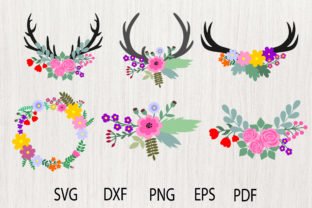
Versatility is a key selling point, but it should not lead to generic application. With 20 distinct types available, there is no need to settle for repetitive designs. A mistake many sellers make is using the same popular antler variation across every product line, diluting their brand identity. Instead, categorize the designs by complexity and mood. Use simpler, single-antler compositions for minimalist jewelry tags or subtle watermarking. Reserve the elaborate, symmetrical pairs featuring dense florals for statement pieces like wedding invitations, nursery wall art, or seasonal packaging.
For educators and bloggers, these assets serve as powerful visual anchors. However, ensure you are respecting licensing terms and maintaining visual hierarchy. Overcrowding a layout with highly detailed antler graphics can distract from text content. Use the PNG versions with transparent backgrounds to create breathing room around headlines or sidebars. The transparency allows for seamless integration over textured backgrounds or colored sections without awkward white boxes disrupting the flow.
Optimizing for Cutting Machines and Crafters
If your primary interest lies in physical crafts, file preparation is non-negotiable. Even high-quality vectors may need optimization for blade cutting. Intricate floral details inside the antlers might be beautiful on screen but impossible to weed at two inches wide. Experienced crafters know to simplify internal paths for small-scale applications. Most vector editing software allows you to merge overlapping shapes or remove unnecessary interior cut lines.
Do not assume "cut file" means "ready to cut instantly." Evaluate the minimum viable size for each of the 20 designs. What works beautifully on a 12x12 scrapbook page may fail on a wine glass decal. Create a reference chart for your personal library noting the smallest successful cut size for each variation. This proactive approach transforms a digital download into a reliable manufacturing asset, reducing trial-and-error waste and increasing production efficiency.
Making Informed Decisions Before Purchase or Use
Before integrating deer antlers with floral cut files into your workflow, assess your current capabilities and equipment. Do you have the software to edit vectors? If not, are the included PNGs high enough resolution for your needs? Understanding your own limitations helps you leverage the set effectively rather than letting valuable assets sit unused. Furthermore, consider the stylistic cohesion of the set. Since these were hand-drawn and digitized, they should share a consistent line weight and artistic voice. Mixing them with disparate clip art sources can create a disjointed final product.
Ultimately, the goal is to enhance your creative output, not complicate it. By respecting the technical differences between file formats, verifying digitization quality, managing color accurately, and optimizing for specific end-uses, you transform a simple download into a cornerstone of your design library. Whether you are a freelancer building a portfolio, a small business owner creating branded packaging, or a hobbyist making personalized gifts, mindful application of these resources ensures your projects stand out for their quality and craftsmanship.