Floral Vintage Pattern with Rose Flowers: Integrating Classic Vector Art into Creative Workflows
In the realm of digital design and print production, finding assets that balance aesthetic beauty with technical versatility is a constant challenge. The Floral Vintage Pattern with Rose Flowers serves as a specialized resource for professionals who require high-fidelity background textures without sacrificing scalability. This asset is not merely a decorative image; it is a functional component within a broader creative workflow. Whether you are designing wedding stationery, developing textile prints, or creating digital marketing collateral, understanding how to leverage this seamless vector pattern ensures consistency and quality across all deliverables.
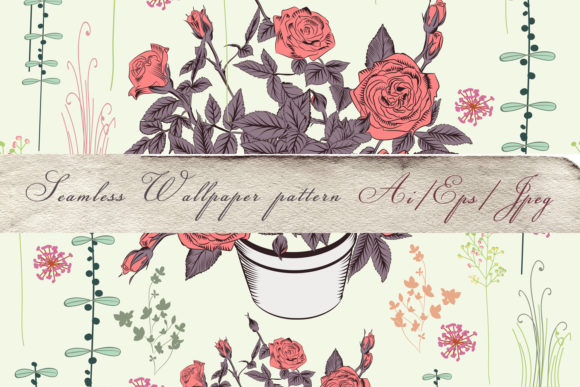
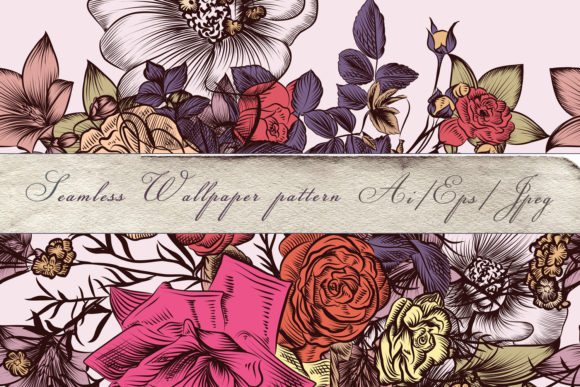
This specific floral vintage pattern with rose flowers distinguishes itself through its hand-drawn characteristics preserved in a vector format. Unlike raster-based alternatives that pixelate when resized, this 100% vector art allows for infinite scaling. For designers and entrepreneurs, this means a single file can serve multiple purposes—from a small business card accent to a large-format wall mural—without requiring separate source files or upscaling software. Integrating this asset effectively requires an understanding of file management, software compatibility, and practical application techniques.
Technical Specifications and File Management
Before incorporating the Floral Vintage Pattern with Rose Flowers into a project, proper file organization is essential. The download package includes three distinct components, each serving a specific role in the production pipeline:
- 1 AiCS2 File: This Adobe Illustrator file (Creative Suite 2 compatible) acts as the master source. It contains fully editable paths, layers, and color information. Because it is saved in CS2 format, it maintains broad backward compatibility while remaining accessible in newer versions of Illustrator.
- 1 EPS10 File: Encapsulated PostScript version 10 is the industry standard for cross-platform vector exchange. If your workflow involves CorelDRAW, Affinity Designer, or older printing systems, this file ensures the seamless design remains intact without requiring proprietary Adobe software.
- 1 JPEG Preview (5000x5000 px): This high-resolution raster reference is crucial for client presentations, mood boards, and quick mockups. At 5000 pixels square, it provides enough detail to visualize texture and color accuracy before opening heavy vector files.
Effective asset management begins immediately upon download. Rename files using a consistent convention that includes the asset name, colorway, and version number. Store the master AI and EPS files in a cloud-synced directory accessible to your team, while keeping the JPEG preview in a lightweight reference folder. Note that mockups shown in promotional materials are not included; you must apply the pattern to your own templates. This distinction is vital for accurate project estimation and client expectation management.
Pre-Production Planning and Asset Evaluation
The decision to use a floral vintage pattern with rose flowers should occur during the planning phase of any design project. Before opening your design software, evaluate the asset against your project requirements. Because this pattern is carefully drawn in a classic style, it pairs best with serif typography, muted color palettes, and traditional layout grids. Attempting to force this vintage aesthetic into a futuristic or minimalist tech interface often creates visual dissonance.
During the evaluation stage, test the seamless tiling capability. Open the EPS10 file and create a new artboard significantly larger than the original tile size. Apply the pattern swatch and zoom in to inspect the registration points. High-quality seamless designs should show no visible seams or repeating artifacts even at 400% magnification. This verification step prevents costly reprints or digital revisions later in the process. Additionally, assess the complexity of the vector nodes. While this illustration is high detailed, extremely dense vector patterns can slow down rendering on lower-spec machines. Testing performance early allows you to plan for potential rasterization steps if working on large-scale formats like vehicle wraps or building signage.
Workflow Integration for Print and Digital Media
Integrating the Floral Vintage Pattern with Rose Flowers varies significantly depending on the output medium. Understanding these distinctions streamlines execution and maintains quality control.
Wedding Stationery and Invitation Suites
For wedding decorators and stationers, this pattern functions as a foundational texture. In Adobe Illustrator, utilize the Pattern Options panel to adjust the scale relative to the invitation size. A common workflow error is using the default tile size, which may appear too busy on a 5x7 inch card. Scale the pattern down to 60-70% for intimate stationery items to preserve the delicate, hand-drawn feel. When preparing for letterpress or foil stamping, separate the pattern onto its own layer. This allows you to toggle visibility easily when generating die-lines or plate files. Always convert text to outlines and embed linked images before sending to professional printers to prevent font substitution or missing link errors.
Fabric Design and Textile Production
Textile designers benefit most from the vector nature of this asset. When preparing files for surface pattern design, ensure the color mode matches your printer’s specifications (typically CMYK for digital fabric printing). The infinite scaling capability allows you to adjust the repeat size for different fabric weights without losing edge definition. For example, a drapey silk chiffon may require a smaller, tighter repeat, while heavy upholstery canvas demands a larger motif. Use the AI file to recolor elements globally. Select similar tones using the Magic Wand tool and apply new global swatches to adapt the vintage rose palette to seasonal trends without redrawing individual petals.
Digital Marketing and Web Assets
While web browsers cannot render raw AI or EPS files directly, the 5000x5000 px JPEG preview serves as a starting point. However, for optimal web performance, do not use the full-resolution preview. Instead, open the vector source and export optimized SVG or WebP formats. SVGs retain crispness on Retina displays while maintaining tiny file sizes. When using this floral vintage pattern with rose flowers as a website background, implement CSS overlay techniques to ensure text readability. A semi-transparent white or dark layer between the pattern and foreground content preserves the vintage ambiance without compromising accessibility standards.
Customization and Quality Control
The true value of vector art lies in its editability. Treat the downloaded files as a foundation rather than a finished product. Customization ensures your work remains unique and aligned with specific brand guidelines.
- Color Grading: Vintage patterns often feature desaturated tones. Use Recolor Artwork in Illustrator to shift hues toward warmer or cooler temperatures based on lighting conditions where the final product will be displayed.
- Element Isolation: Ungroup the pattern to extract individual roses or leaves. These isolated elements function as standalone spot illustrations for social media graphics, watermarks, or packaging stickers, maximizing ROI on a single asset purchase.
- Density Adjustment: Create variations by deleting select elements within the pattern definition. A sparser arrangement works better for backgrounds with heavy text overlays, while the full-density version suits border treatments or endpapers.
Quality control extends beyond visual inspection. Verify color profiles before final output. Screen colors differ from print results, especially with complex floral gradients. Request physical proofs or Pantone references when matching the vintage rose tones to other branded materials. Consistency across touchpoints builds trust and professionalism, whether you are a freelancer delivering to a client or a business owner managing internal branding.
Long-Term Asset Utility and Licensing Awareness
Sustainable creative workflows depend on reusable resources. The Floral Vintage Pattern with Rose Flowers offers longevity because classic styles resist trend cycles. Archive completed projects with notes on how the pattern was modified. Documenting custom colorways, scale adjustments, and successful pairings creates an internal knowledge base that accelerates future projects.
Always review licensing terms associated with the asset. Understanding usage rights prevents legal complications when scaling from personal projects to commercial merchandise. Keep license documentation alongside the source files in your asset management system. If you encounter technical issues or need clarification on permissible uses, reach out to the creator directly. As noted in the asset description, assistance is available. Building relationships with artists fosters better support and potentially opens doors to custom commissions tailored to your specific workflow needs.
Ultimately, this floral vintage pattern with rose flowers represents more than decorative imagery; it is a production-ready tool. By approaching it with systematic planning, technical diligence, and strategic customization, creators transform a beautiful illustration into a reliable engine for consistent, high-quality design outcomes. The joy embedded in its creation translates to efficiency and satisfaction in your own professional practice when integrated thoughtfully into established workflows.